vue-resource是一个通过XMLHttpRequrest或JSONP技术实现异步加载服务端数据的Vue插件。提供了一般的 HTTP请求接口和RESTful架构请求接口,并且提供了全局方法和VUe组件实例方法。在Vue.js 2.0+ 版本推荐使用 axios 来完成 ajax 请求。
参考文献 https://www.runoob.com/vue2/vuejs-ajax.html
Get请求
1
2
3
4
5
6
7
8
9
10
11
12
13
14
15
16
17
18
| window.onload = function(){
var vm = new Vue({
el:'#box',
data:{
msg:'Hello World!',
},
methods:{
get:function(){
this.$http.get('http://www.liulongbin.top:3005/api/getprodlist').then(function(res){
document.write(res.body);
},function(){
console.log('请求失败处理');
});
}
}
});
}
|
如果需要传递数据,可以使用 this.$http.get(‘get.php’,{params : jsonData}) 格式,第二个参数 jsonData 就是传到后端的数据。
1
2
3
4
5
| this.$http.get('http://www.liulongbin.top:3005/api/getprodlist',{params : {a:1,b:2}}).then(function(res){
document.write(res.body);
},function(res){
console.log(res.status);
});
|
post请求
post 发送数据到后端,需要第三个参数 {emulateJSON:true}。
emulateJSON 的作用: 如果Web服务器无法处理编码为 application/json 的请求,你可以启用 emulateJSON 选项。
1
2
3
4
5
6
7
8
9
10
11
12
13
14
15
16
17
18
19
|
window.onload = function(){
var vm = new Vue({
el:'#box',
data:{
msg:'Hello World!',
},
methods:{
post:function(){
this.$http.post('http://www.liulongbin.top:3005/api/getprodlist',{name:"谢振瑜",url:"xiezhenyu98.github.io"},{emulateJSON:true}).then(function(res){
document.write(res.body);
},function(res){
console.log(res.status);
});
}
}
});
}
|
语法 & API
使用全局对象方式 Vue.http 或者在一个 Vue 实例的内部使用 this.$http来发起 HTTP 请求。
1
2
3
4
5
6
7
|
Vue.http.get('/someUrl', [options]).then(successCallback, errorCallback);
Vue.http.post('/someUrl', [body], [options]).then(successCallback, errorCallback);
this.$http.get('/someUrl', [options]).then(successCallback, errorCallback);
this.$http.post('/someUrl', [body], [options]).then(successCallback, errorCallback);
|
vue-resource 提供了 7 种请求 API(REST 风格):
1
2
3
4
5
6
7
| get(url, [options])
head(url, [options])
delete(url, [options])
jsonp(url, [options])
post(url, [body], [options])
put(url, [body], [options])
patch(url, [body], [options])
|
除了 jsonp 以外,另外 6 种的 API 名称是标准的 HTTP 方法。
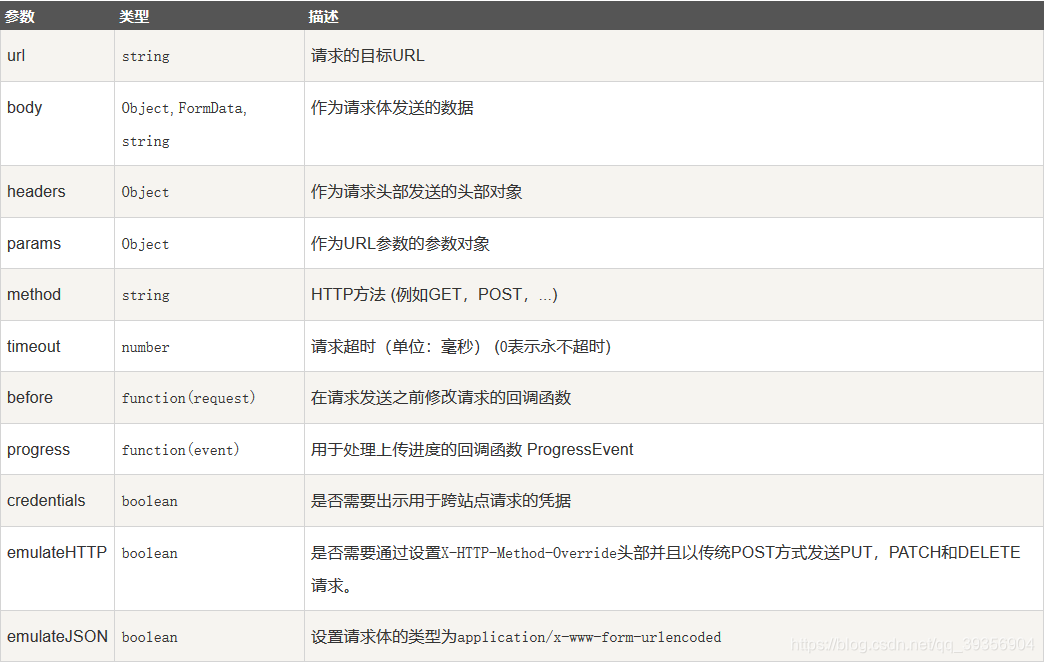
options 参数说明:
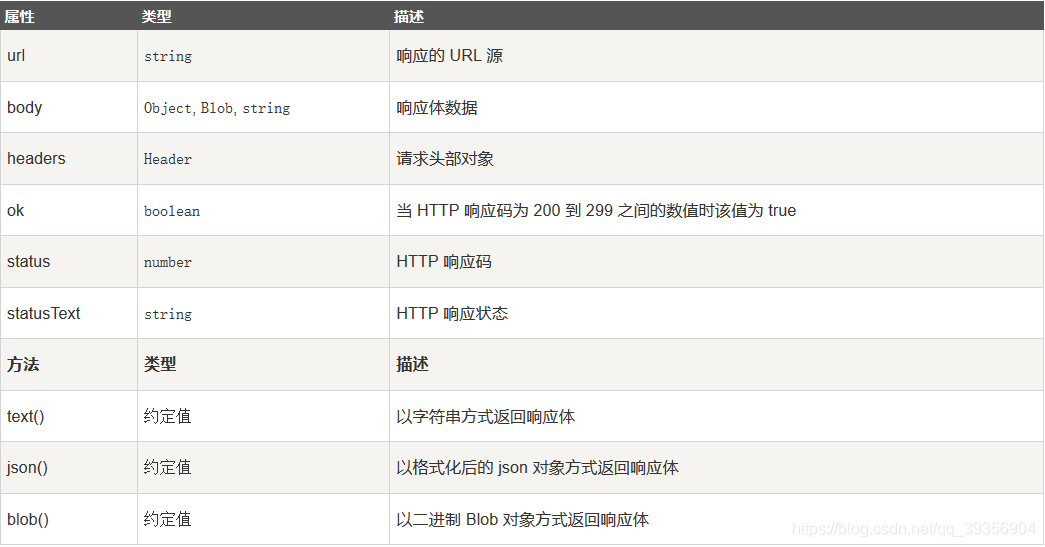
通过如下属性和方法处理一个请求获取到的响应对象:
使用 vue-resource 的 jsonp 处理跨域请求
1
2
3
4
5
6
7
8
9
10
11
12
13
14
15
16
17
18
19
20
21
22
23
24
25
26
27
28
29
30
31
32
33
34
35
| <div id="app">
请输入关键字:<input type="text" v-model="keyword" @keyup="sendJsonP(keyword)">
<ul>
<li v-for="r in result">{{r}}</li>
</ul>
</div>
<script>
window.onload = function () {
new Vue({
el: '#app',
data: {
keyword: '',
result: ''
},
methods: {
sendJsonP(keyword) {
let url = 'https://www.baidu.com/sugrec?pre=1&p=3&ie=utf-8&json=1&prod=pc&from=pc_web';
this.$http.jsonp(url, {
params: {
wd: keyword
},
jsonp: 'cb'
}).then(res => {
if (res.data.g) {
this.result = res.data.g.map(x => x['q']);
} else {
this.result = [];
}
});
}
}
});
}
</script>
|
品牌列表案例
1
2
3
4
5
6
7
8
9
10
11
12
13
14
15
16
17
18
19
20
21
22
23
24
25
26
27
28
29
30
31
32
33
34
35
36
37
38
39
40
41
42
43
44
45
46
47
48
49
50
51
52
53
54
55
56
57
58
59
60
61
62
63
64
65
66
67
68
69
70
71
72
73
74
75
76
77
78
79
80
81
82
83
84
85
86
87
88
89
90
91
92
93
94
95
96
97
98
99
100
101
102
103
104
105
106
107
108
109
110
111
112
113
114
115
116
117
118
119
120
121
122
123
124
125
126
127
128
129
130
131
132
133
134
135
| <!DOCTYPE html>
<html lang="en">
<head>
<meta charset="UTF-8">
<meta name="viewport" content="width=device-width, initial-scale=1.0">
<meta http-equiv="X-UA-Compatible" content="ie=edge">
<title>Document</title>
<script src="./lib/vue.js"></script>
<script src="https://cdn.staticfile.org/vue-resource/1.5.1/vue-resource.min.js"></script>
<link rel="stylesheet" href="./lib/bootstrap.min.css">
</head>
<body>
<div id="app">
<div class="panel panel-primary">
<div class="panel-heading">
<h3 class="panel-title">添加品牌</h3>
</div>
<div class="panel-body form-inline">
<label>
Name:
<input type="text" v-model="name" class="form-control">
</label>
<input type="button" value="添加" @click="add" class="btn btn-primary">
</div>
</div>
<table class="table table-bordered table-hover table-striped">
<thead>
<tr>
<th>Id</th>
<th>Name</th>
<th>Ctime</th>
<th>Operation</th>
</tr>
</thead>
<tbody>
<tr v-for="item in list" :key="item.id">
<td>{{ item.id }}</td>
<td>{{ item.name }}</td>
<td>{{ item.ctime }}</td>
<td><a href="#" @click.prevent="del(item.id)">删除</a></td>
</tr>
</tbody>
</table>
</div>
<script>
Vue.http.options.root = 'http://www.liulongbin.top:3005';
Vue.http.options.emulateJSON = true;
var vm = new Vue({
el:'#app',
data:{
name:'',
list:[
{id:1, name:'五菱宏', ctime:new Date()},
{id:2, name:'众泰', ctime:new Date()}
]
},
created(){
this.getAllList();
},
methods:{
add(){
this.$http.post('api/addproduct', {name:this.name}).then(result => {
if(result.body.status === 0){
alert(result.body.message);
this.getAllList();
}else{
alert("添加失败!");
}
})
},
getAllList(){
this.$http.get('api/getprodlist').then(result=>{
var result = result.body;
if(result.status === 0){
this.list = result.message;
}else{
alert('获取数据失败');
}
})
},
del(id){
this.$http.get('api/delproduct/'+id).then(result => {
if(result.body.status === 0){
this.getAllList();
alert("删除成功!");
}else{
alert("删除失败!");
}
})
}
}
})
</script>
</body>
</html>
|